
Peptides Calculator Guide for Australian Labs

A junior researcher arrives at the bench with a labelled peptide vial, a planned dilution, and an assay starting later that day. The arithmetic looks simple, but one incorrect unit, an unverified mass value, or a changed reconstitution volume can carry through every downstream sample. In an Australian research laboratory, a peptides calculator should therefore be treated as a verification tool, not a dosing gadget.
The calculator converts vial mass, diluent volume and a target amount into a theoretical concentration and draw volume. The result still needs to be checked against the lot-specific Certificate of Analysis, the laboratory's SOP and, where accuracy is critical, independent analytical testing. Products are supplied strictly for laboratory research purposes only. They are not for human consumption, therapeutic use or diagnostic procedures.
Table of Contents
- What a Peptides Calculator Does in a Research Lab
- Core Inputs and the Concentration Formula
- Worked Examples with Australian Vial Formats
- Unit Conversions and Common Pitfalls
- Validating Calculator Results Against Lab Data
- Fitting the Calculator into SOPs and Procurement
- Troubleshooting and Frequently Asked Questions
What a Peptides Calculator Does in a Research Lab
A peptides calculator adds a consistent maths layer to reconstitution planning. Australian-facing calculator tools commonly use vial strength in milligrams, bacteriostatic water in millilitres and a target amount in milligrams or micrograms. They return values such as concentration, syringe draw volume and doses per vial, allowing a researcher to cross-check preparation steps before creating an aliquot. This repeated formula appears across Australian research-supplier tools, including the Australian peptide calculator.
The workflow is straightforward, but the discipline around it matters:
- Read the vial and batch record. Confirm the compound name, stated vial quantity, lot number and any assay or peptide-content correction.
- Enter the actual research inputs. Use the net peptide content, the measured diluent volume and the intended laboratory concentration or amount.
- Review the output. Check whether the concentration and draw volume make sense for the assay, vessel and available equipment.
- Record the calculation. Preserve the original inputs, not only the final answer, so another researcher can reproduce or recalculate it.
- Obtain the required review. Follow the lab SOP before any aliquot is prepared or used in an experiment.
Bench rule: The calculator output is theoretical. The batch document and validated analytical method determine whether that theoretical value is suitable for the experiment.
This distinction is especially important for Australian universities, biotechnology companies, CROs and institutional laboratories. A calculation may be mathematically correct while still using the wrong peptide form, gross powder weight or outdated batch information. Australian research documentation also places emphasis on traceable laboratory analysis. Government guidance states that a laboratory analysis certificate should identify that a sample was analysed, the method used and the date of analysis in its supporting-document requirements.
A reliable calculator record links the vial in hand to its lot-specific documentation and to the final preparation record. It doesn't replace the SOP, a COA review or analytical confirmation. It helps the operator identify arithmetic and unit errors before they become experimental errors.
Core Inputs and the Concentration Formula
Most research calculators require three core inputs. The first is the net peptide mass per vial, normally entered in milligrams. The second is the added diluent volume, entered in millilitres. The third is either the target concentration or the desired amount for a calculated draw volume.
The basic relationship is:
Concentration in mg/mL = peptide mass in mg ÷ diluent volume in mL
Once concentration is known:
Draw volume in mL = desired amount in mg ÷ concentration in mg/mL
For microgram work, convert the target amount before calculating. A microgram is one-thousandth of a milligram, so a target of 250 micrograms is 0.25 milligrams. Australian calculator guidance describes the same mechanics, including the U-100 conversion, in its peptide reconstitution calculator guide.
| Output | Formula | Typical use |
|---|---|---|
| Concentration | Mass in mg ÷ volume in mL | Establish the theoretical stock concentration |
| Draw volume | Desired amount in mg ÷ concentration in mg/mL | Calculate the volume for an experimental aliquot |
| U-100 units | Draw volume in mL × 100 | Translate millilitres into U-100 syringe markings |
| Required diluent | Mass in mg ÷ target concentration in mg/mL | Back-solve the volume needed for a planned stock |
A 1 mL U-100 syringe equals 100 units, and one unit equals 0.01 mL or 10 µL, as described in Australian calculator documentation for U-100 preparation maths. These units describe volume markings. They don't describe peptide mass, and they shouldn't be entered into a calculator field labelled milligrams or millilitres.
The mass input needs more scrutiny than the label alone may suggest. Gross lyophilised powder weight includes material that may not be peptide, including residual moisture or counter-ions. Use the net peptide content stated or supported by the batch documentation. Measure the final solvent volume with calibrated equipment, and account for practical dead volume where the SOP requires it.
Use full precision during intermediate calculations and round only at the final reporting step. Early rounding can make replicate preparations disagree even when the same vial and solvent volumes were used. Record both the unrounded calculator output and the final operational value selected by the approved SOP.
Worked Examples with Australian Vial Formats
The following examples are laboratory mathematics only. They show how net mass and solvent volume affect a calculated concentration. They aren't instructions for human or veterinary administration.
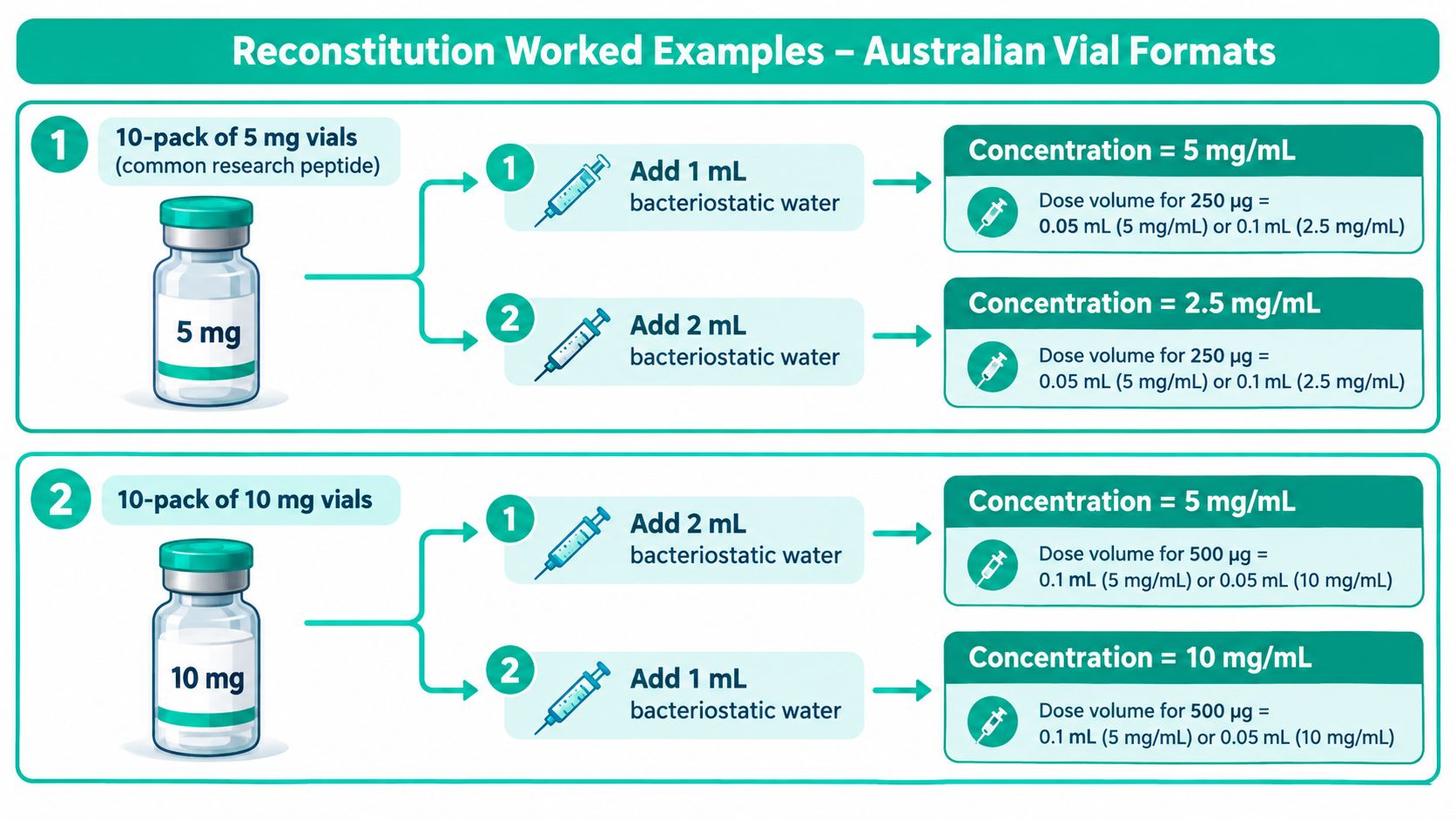
Example one with a 5 mg vial
Assume one vial from a 10-pack of 5 mg vials contains 5 mg net peptide, and the worksheet specifies 2 mL of bacteriostatic water.
- Mass: 5 mg.
- Diluent: 2 mL.
- Concentration: 5 mg ÷ 2 mL = 2.5 mg/mL.
- Target working amount: 250 micrograms = 0.25 mg.
- Draw volume: 0.25 mg ÷ 2.5 mg/mL = 0.1 mL.
- U-100 equivalent: 0.1 mL × 100 = 10 units.
The aliquot tube should be labelled with the compound identifier, lot number, calculated concentration, preparation date, operator initials and the applicable storage condition from the SOP. The worksheet should retain the original 5 mg and 2 mL inputs.
Example two with an assay correction
Now take one vial from a 10-pack of 10 mg vials where the COA states 85% peptide content by HPLC. The gross label amount is 10 mg, but the calculated net peptide mass is:
10 mg × 0.85 = 8.5 mg net peptide
If the vial is reconstituted with 1 mL of diluent:
8.5 mg ÷ 1 mL = 8.5 mg/mL
For an intermediate dilution, transfer 0.1 mL of that solution into 0.9 mL of diluent. The transferred peptide amount is:
8.5 mg/mL × 0.1 mL = 0.85 mg
The final intermediate volume is:
0.1 mL + 0.9 mL = 1.0 mL
Therefore, the intermediate concentration is:
0.85 mg ÷ 1.0 mL = 0.85 mg/mL = 850 micrograms/mL
Label the intermediate tube with the corrected concentration, source lot, transfer volume, diluent volume and operator details. The net-versus-gross distinction is the important control. Entering 10 mg instead of 8.5 mg would overstate the theoretical concentration.
The research reconstitution guide can sit alongside the approved worksheet as a general calculation reference. A 10-pack changes purchasing and per-vial cost calculations, but it doesn't change the reconstitution maths for each individual vial. Each vial still needs its own identity, lot traceability and preparation record.
Unit Conversions and Common Pitfalls
Unit errors usually happen at the hand-off between the label, calculator and equipment. The conversion from milligrams to micrograms is fixed: 1 mg equals 1000 micrograms. For molarity, the researcher must also know the correct molecular weight, including whether the material is supplied as a salt or includes a stated counter-ion.
For a peptide with molecular weight expressed in grams per mole:
mM = mg/mL ÷ molecular weight in g/mol
Then:
µM = mM × 1000
Mass-to-molar conversion can be written as:
Moles = mass in mg ÷ molecular weight in g/mol ÷ 1000
For U-100 equipment, divide units by 100 to obtain millilitres. Australian calculator documentation uses the basis that 100 units equals 1 mL, so 10 units equals 0.1 mL in its stated conversion guidance.
The most common failure modes are practical rather than advanced:
- Salt or counter-ion confusion: A stated vial mass may refer to a salt form or a corrected peptide content. Use the molecular-weight basis specified in the COA and SOP.
- Residual moisture: Lyophilised material can retain moisture, so gross powder weight isn't automatically net peptide weight. Apply only a documented correction.
- Partial-vial handling: Once a vial is opened or reconstituted, the remaining material needs a clear status, storage record and linkage to the original batch.
- Premature rounding: Rounding concentration before calculating the final volume can shift the reported draw value.
- Field mismatch: Entering micrograms into a milligram field, or U-100 units into a millilitre field, produces a formally calculated but meaningless result.
That image URL must be exact, but the supplied visual reference contains an arithmetic example that should be checked before publication. In particular, the molecular-weight conversion should follow the formula above, and any claimed error multiplier should be treated as a unit-control warning rather than an operational instruction.
When a result looks implausible, use a short diagnostic order:
- Check the molecular-weight basis and salt form.
- Check whether the COA reports net peptide content or gross material.
- Check the actual diluent volume and the calculator units.
- Recalculate from the original recorded inputs.
Validating Calculator Results Against Lab Data
A calculator produces a theoretical concentration. Validation begins by confirming that the vial used at the bench is the same vial described in the documentation. Match the compound identifier and lot number on the vial to the COA, then check whether the reported result covers identity, peptide content, purity and the analytical method used.
Suitable confirmation may involve HPLC, LC-MS or amino-acid analysis, depending on the research question and the laboratory's validated method. HPLC can support a purity or content assessment, LC-MS can support molecular identity, and amino-acid analysis can provide a quantitative readout when the method is appropriate for the material. Manufacturer-provided documentation should be clearly distinguished from independent laboratory testing. One shouldn't be treated as a substitute for the other.
A useful reconciliation record contains:
- The labelled vial mass and documented net peptide content.
- The molecular weight used in any molar calculation.
- The solvent and measured final volume.
- The calculated concentration.
- The analytical method, instrument identifier and result.
- The operator, reviewer and date.
- The lot number and any amended COA version.
If an absorbance-based measurement is used, the laboratory must apply the validated extinction coefficient, path length and dilution factor. A quantitative amino-acid result should be converted back to delivered peptide mass, then entered into the calculator for any subsequent dilution. Don't force a measured result to fit the original theoretical input.
| Measured purity (%) | Action on calculator input | Documentation requirement |
|---|---|---|
| Above 95% | Review whether the documented result supports use of the labelled net mass | Retain the COA, method, lot number and reconciliation record |
| 80% to 95% | Apply the documented correction factor before planning further dilution | Record the corrected mass, calculation version and reviewer |
| Below 80% | Pause the workflow and assess re-purification, rejection or supplier investigation | Record the out-of-specification decision and supporting analytical evidence |
The thresholds in this table are workflow criteria supplied for this article, not universal acceptance limits. Each institution should use its approved quality system and compound-specific method. For batch-document interpretation, review the peptide Certificate of Analysis resource, and verify whether a document is manufacturer-provided, independent, pending or unavailable.
Quality control point: If calculated and measured values diverge materially, pause the experiment. Investigate moisture, aggregation, incomplete dissolution, assay recovery and incorrect molecular weight before proceeding.
Fitting the Calculator into SOPs and Procurement
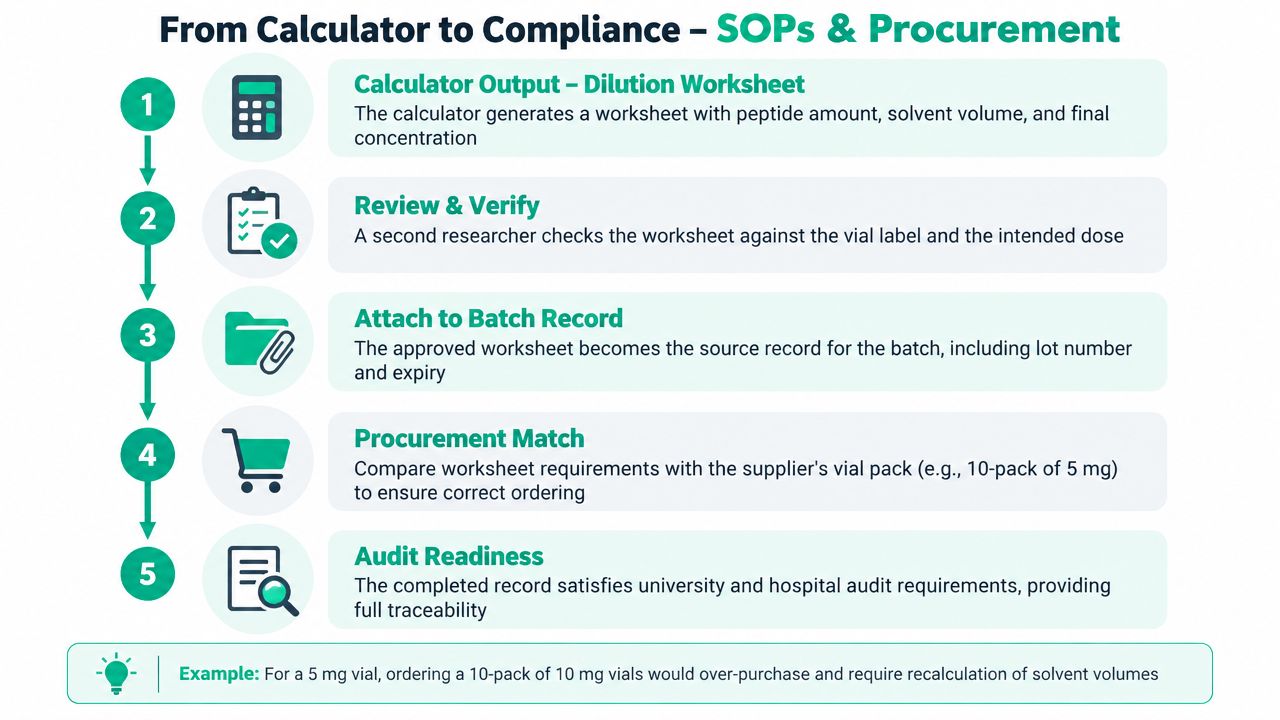
A calculator becomes defensible when its output is treated as a controlled record. The worksheet should move with the material through receiving, preparation, stock control and review. It shouldn't live as an isolated screenshot or an unversioned spreadsheet cell.
A practical document chain looks like this:
- Receiving inspection: Record the supplier, product identifier, lot number, stated vial quantity and condition at receipt.
- COA review: Match the batch document to the physical vial and identify whether the test report is manufacturer-provided or independent.
- Dilution worksheet: Preserve peptide mass, correction factor, solvent volume, calculated concentration and final selected volume.
- Preparation record: Add operator, reviewer, date, equipment and aliquot identifiers.
- Stock control: Reconcile prepared, retained and consumed vials with the procurement order.
- QA archive: Store the worksheet with the batch record and any analytical reconciliation.
Use a version-controlled template rather than a personal calculator file. The template should retain original inputs, formulas and units, because a later COA amendment may require the calculation to be rerun. A second researcher should review the worksheet against the vial and intended experiment before preparation. Whether dual sign-off is mandatory depends on the institution, but it is a sensible control for higher-consequence work.
Australian procurement teams also need to evaluate documentation before placing an order. A usable COA should connect the batch number, chromatogram, mass-spectrometry identity and testing laboratory to the vial in hand, as described in Australian-facing guidance on understanding certificates of analysis. That connection helps a buyer assess whether a calculator result can be supported during internal review.
Bulk Aussie Peptides is one Australian supplier that presents research-use-only peptide formats with product specifications and batch documentation for procurement review. The supplier's bulk 10-pack format may help a laboratory align ordering with a planned study, but the buyer still needs to verify each product's documentation, stated quantity and testing status.
The procurement test is simple: can another trained person reconstruct why this vial, this solvent volume and this concentration were selected? If the answer is yes, the calculator has become part of the quality system rather than a convenience tool.
Troubleshooting and Frequently Asked Questions
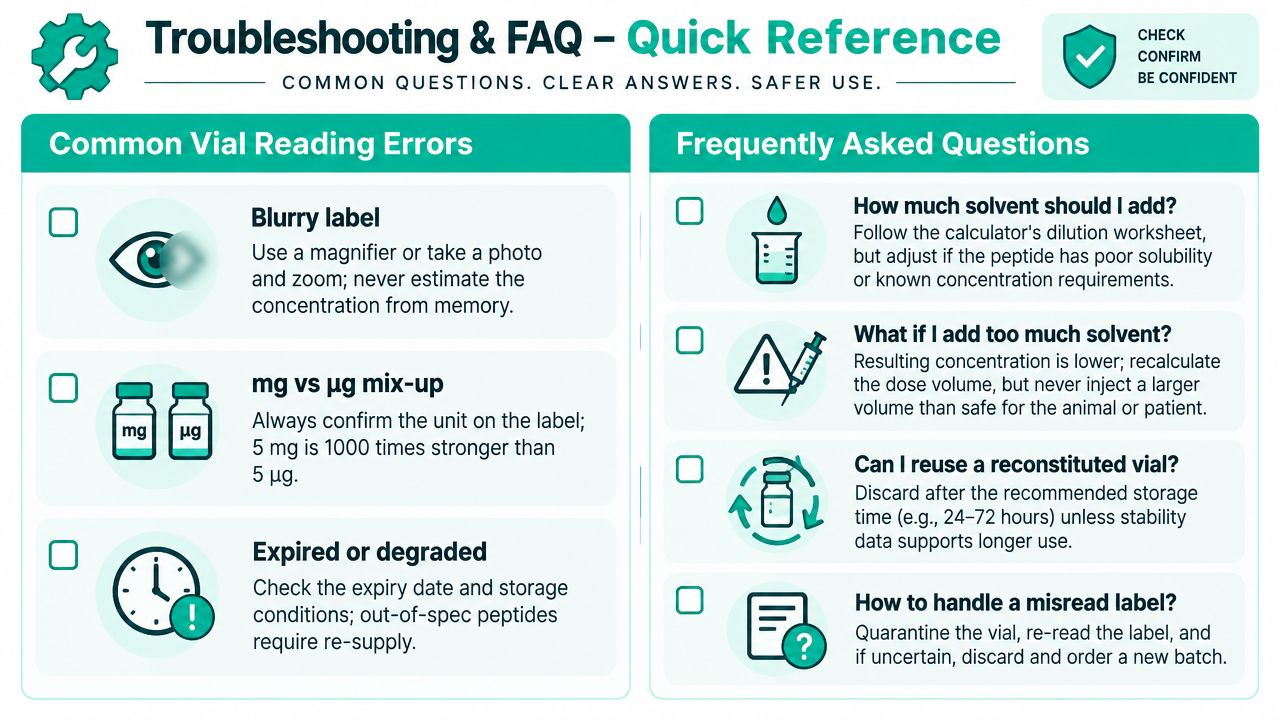
When a worksheet and the bench result don't agree, stop and check the record before making another dilution. Start with the vial label, then the unit fields, then the solvent and storage history.
- Blurry label: Quarantine the vial until the identifier, lot and quantity are confirmed from controlled records.
- Unexpected concentration: Re-enter the original mass and volume without rounding, then check whether the calculator expects mg, micrograms, millilitres or units.
- Poor dissolution: Follow the compound-specific SOP and solvent compatibility information. Don't substitute a solvent because it is convenient.
- Changed reconstitution volume: Recalculate concentration and every downstream draw volume from the new final volume.
- Storage uncertainty: Check the approved stability record and storage conditions rather than relying on a generic time window.
What should determine the stability window?
The compound-specific stability study, validated SOP and storage record should determine the usable window after reconstitution. A generic calculator can't establish stability, and a supplier page shouldn't be treated as a substitute for validated laboratory data.
Can a lyophilised vial undergo freeze-thaw cycles?
Only follow evidence and instructions relevant to that compound, container and storage condition. If the study record doesn't support repeated freeze-thaw exposure, avoid assuming that the material remains unchanged.
How should a partial vial be handled?
Keep it linked to the original lot and preparation record. Record the remaining amount, storage condition, date, operator and any new calculation. If the identity, exposure history or concentration is uncertain, quarantine it and escalate through the SOP.
When does a COA discrepancy require recalculation?
Recalculate when the amended document changes net peptide content, purity correction, molecular weight or another calculator input. Don't discard automatically, but don't continue automatically either. A discrepancy that affects identity, traceability or suitability should trigger QA review and may require rejection.
The calculator is useful because it makes the arithmetic visible. It isn't a substitute for a controlled worksheet, a lot-specific COA, an appropriate analytical method or a trained reviewer.
For Australian research teams, Bulk Aussie Peptides provides research-use-only peptide formats, product specifications and batch documentation that can be reviewed alongside a reconstitution worksheet. Visit the catalogue to compare vial formats and documentation before procurement, then confirm the selected batch and calculation against your laboratory SOP.